
Create flashcards from text in an image: a classroom OCR workflow
To create flashcards from text in a picture, add the image through Text from image in to teach, then choose Flashcards. Text extraction, also called optical character recognition (OCR), reads the words in an image. This is useful when the material you want to revisit is a scan or screenshot rather than editable text. Keep the original beside the cards: headings, columns and small qualifying words can change what an answer means.
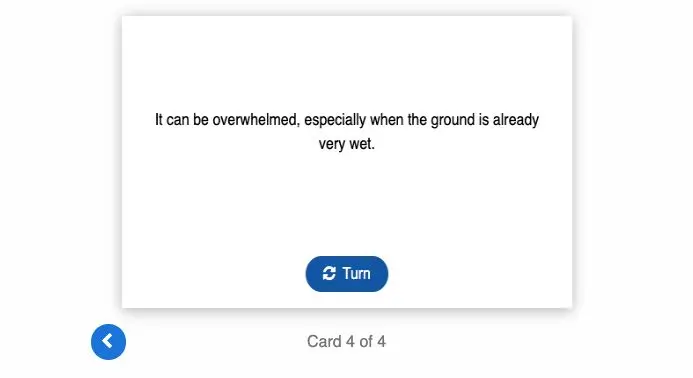
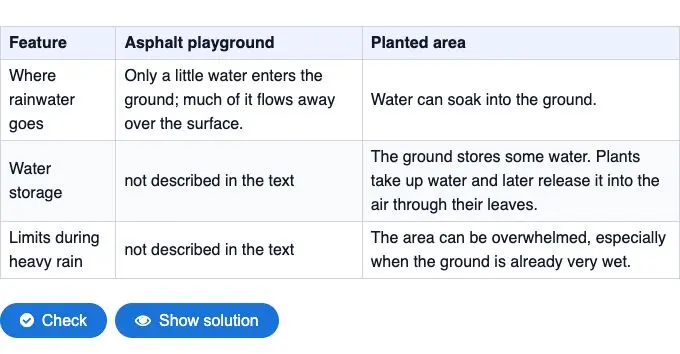
Our example starts with a screenshot of a classroom comparison table about rainwater on asphalt and planted ground. We used the text-extraction source option, generated four English cards and checked them against the table. The final card asks what can happen to planted ground during heavy rain, especially when the soil is already wet.
Open the original comparison table
Try the four flashcards — open in full view
Choose text extraction for written content
The source picker separates Text from image from Image. For a page of writing or a table screenshot, choose Text from image. For a photograph or diagram whose visual content is the subject of the task, Image serves a different purpose. Do not treat the two as interchangeable.
Keep column headings and row labels in a table screenshot. Cropping down to a single cell can remove the information that tells you what the statement describes. In our source, “not described in the text” belongs to the asphalt column; the condition about very wet ground belongs to the planted-area column.
Upload the image and set a focused task
In Material Tools, add a source and select Text from image. Upload the file and save it. The current form accepts PNG and JPG files up to 10 MB. Wait for the filename to appear in the source panel, then choose Flashcards, an output language, explanation level and card count.
We selected English, the middle explanation level and four cards. The instruction asked about water movement on asphalt, water movement in planted ground, water storage and the limit during heavy rain. It also specified: keep each statement attached to its column; do not turn “not described” into “none”; retain the condition that soil may already be wet.
Read each answer across its original row
The first two cards distinguish water running over asphalt from water soaking into planted soil. The storage card describes water held in the soil and water taken up by plants. Ask pupils to distinguish water remaining in the soil from water entering plants.
Check that each card names the correct surface. Our first version incorrectly asked about asphalt; the table’s heavy-rain warning refers to planted ground. The question is “What can happen to a planted area during heavy rain?” Its answer is “It can be overwhelmed, especially when the ground is already very wet.”
To make this kind of precise edit, open the saved exercise in My content, choose Edit and then Edit questions. Change the question and answer fields for the affected card and save. Open the exercise’s share link and turn the edited card over to check that the question and answer match the table.
Missing information needs a separate check. If the table says a limit is not described, that is not evidence that no limit exists. Keep that distinction when discussing the cards, and ask pupils to point to the cell that supports an answer.
Use the image and cards together in class
Give pairs the source table first. Ask them to identify the surfaces being compared and the three features down the left-hand side. Then let one pupil answer a card before turning it; the partner finds the supporting cell. Swap roles for the next card.
For the final question, ask pupils to explain why the words “especially when the ground is already very wet” matter. Finish by comparing two statements: “The source does not describe a limit” and “There is no limit.” The table gives you a concrete way to discuss the difference.
Keep the route from source to explanation short
Use Text from image when your written source is a scan or screenshot. If the original is already an editable passage, paste that passage directly. If you have the PDF, use the PDF source workflow. These choices keep the material close to its original form and make comparison easier.
In a lesson plan, place reading the table before the card round, then use a short explanation task afterwards. The cards support that sequence: learners find information, retrieve it, and explain how the two surfaces differ.
Bereit, diese Idee in eigenes Unterrichtsmaterial umzusetzen?
Schließe dich tausenden Lehrkräften an und bereite deinen Unterricht mit KI schneller, differenzierter und kreativer vor.
DSGVO-konform · In 30 Sek. startklar · Keine Kreditkarte nötig
Du interessierst dich für eine Schullizenz? Beratungsgespräch vereinbaren