
Create classroom questions from an image: read a table, compare, explain
Upload an image to to teach and choose Questions with sample solutions to build a short activity around what pupils can find in it. With a table, the important step is connecting each answer to the right row and column. Keep the image beside the questions so pupils can point to their evidence.
Read across the table
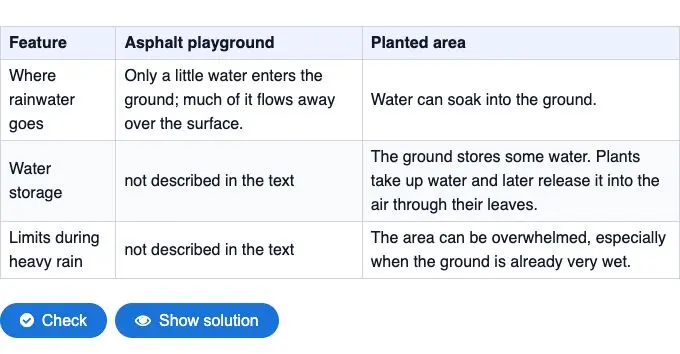
Our example uses an image of an existing to teach comparison table. It contrasts an asphalt playground with a planted area: where rainwater goes, how water is stored and what happens during heavy rain. The three questions ask pupils to compare the surfaces, explain the planted area's water storage and examine the limits of what the table tells them.
The first answer needs information from both columns. On asphalt, only a little water enters the ground and much flows over the surface; in the planted area, water can soak into the ground. Ask pupils to name both surfaces in their response. “Water soaks into the ground” alone does not show that they have made the comparison.
Answer the questions about rainwater and the two surfaces
Choose Image as the source
Open Questions with sample solutions, open the source selector and choose Image. In the German interface these are Fragen mit Musterlösungen and Bild. Upload your PNG or JPG, then save the source. The picker currently accepts files up to 10 MB. We used the table image shown above, selected English and medium difficulty, and described the intended age group as 11–13.
Keep the row labels and column headings in the uploaded image. A crop that removes “Asphalt playground” changes what pupils can identify, even if the remaining words are sharp. For a page of continuous printed text, use Text from image instead; that is a separate source option. This example uses a table screenshot and does not demonstrate interpreting a photograph or artwork.
Tell the tool what the questions should reveal
In the instruction box, name the reading moves you want: compare the two columns, explain storage and plant uptake, and preserve the condition about ground that is already very wet. We also asked for a question about the cells labelled “not described in the text”. Those cells give the lesson a useful reasoning problem: missing information is not the same as evidence that something cannot happen.
We requested four questions; the result combined the last two ideas into a third question. The finished activity therefore has three response boxes. For a class that needs a shorter final task, discuss the heavy-rain part orally before asking pupils to write the missing-information explanation. Keep the two expectations separate when reviewing their answers.
What to check in the model answers
The final model answer says the planted area can be overwhelmed during heavy rain, especially when the ground is already very wet. That condition matters. Removing it would flatten the comparison into “plants prevent flooding”, which the table does not say.
It also explains that the table does not prove asphalt stores no water. Its relevant cell says the source text did not describe storage. A pupil who writes “we cannot tell from this table” and points to that cell has identified the evidence limit. They do not need to copy the sample answer word for word.
For your own table, check each model answer against its row and column before sharing. If you want pupils to bring in prior knowledge, ask a separate follow-up such as what else they would need to investigate before choosing a playground surface. That question extends the lesson beyond this table; it should not quietly become a requirement in a source-reading answer.
Use the questions after a first reading
Give pupils time to read the headings and trace one row across both surfaces. Then let them answer independently, open the model solutions and revise one response with a partner. Ask them to underline the phrase in the table that supports the revision. This makes the comparison visible in their work.
The source table comes from the same rainwater example used in our table-creation guide. Use that guide when you want pupils to organise a reading into a table first, then return to these questions to check what they can explain from it.
Bereit, diese Idee in eigenes Unterrichtsmaterial umzusetzen?
Schließe dich tausenden Lehrkräften an und bereite deinen Unterricht mit KI schneller, differenzierter und kreativer vor.
DSGVO-konform · In 30 Sek. startklar · Keine Kreditkarte nötig
Du interessierst dich für eine Schullizenz? Beratungsgespräch vereinbaren