
Create a classroom crossword from your own text
A classroom crossword works best when its clues bring pupils back to the meaning of words they have just met. Start with a short source, choose the vocabulary worth revisiting, and use to teach to turn it into an editable puzzle. This guide follows a pond food-chain example from the reading passage to the printed grid.
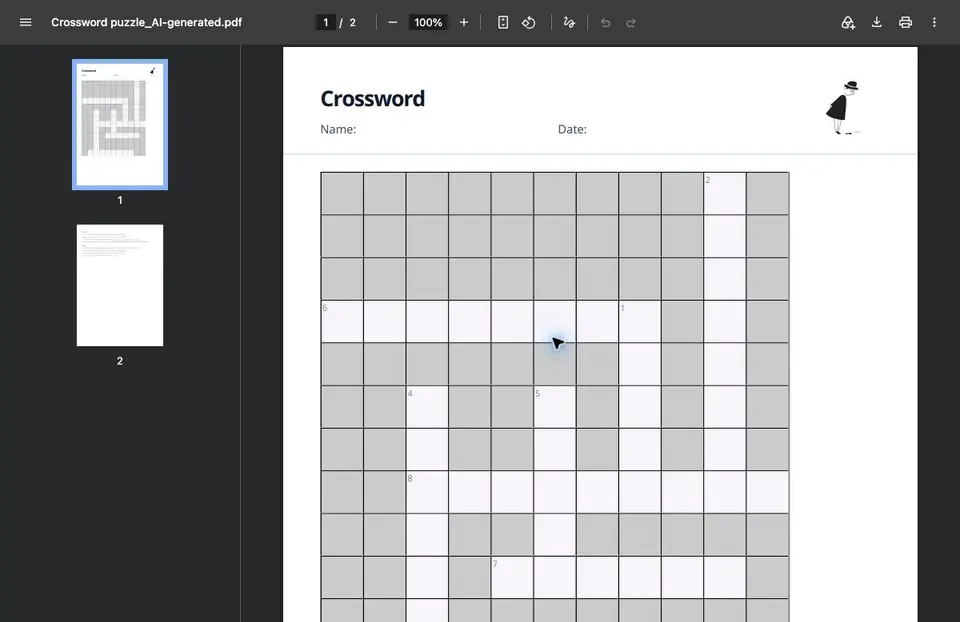
Open the finished crossword. The example contains eight words and a solution view. Use it after reading the passage below, or follow the same steps with your own class text.
Open the finished crossword — full view
The source: a school pond food chain
Algae use sunlight to make their own food. Water fleas eat algae. Small fish eat water fleas, and a heron can eat the fish. The arrows in this food chain point from the organism being eaten to the organism that eats it. They show the direction in which energy is transferred. Algae are producers. Water fleas, fish and herons are consumers. Bacteria and fungi break down dead organisms. These decomposers release nutrients that plants and algae can use again. A food web connects several food chains because most organisms have more than one food source.
Choose the words before you generate the grid
For this example, we chose ALGAE, SUNLIGHT, PRODUCER, CONSUMER, HERON, BACTERIA, ENERGY and NUTRIENTS. The list mixes organisms with the concepts needed to explain the food chain. We kept PRODUCER and CONSUMER singular: otherwise a clue about “an organism” can lead pupils to the right concept but the wrong number of letters.
Eight words keep this particular task focused. A longer source does not mean every new term belongs in the puzzle. Pick the vocabulary your pupils need for the next explanation or discussion; leave incidental names out.
Build it in to teach
1. Create a crossword in to teach. Sign in, open the source selector and choose Text.
Create a crossword in to teach
2. Add a recognizable source title and paste the passage. Save the source if you want to use it for another activity.
3. Select Crossword, set the output language to English and choose eight questions.
4. In the instruction field, give the eight answer words, the age range and the clue style. Then create the exercise.
Our instruction was: “Create an English crossword for ages 10–12 using only ALGAE, SUNLIGHT, PRODUCER, CONSUMER, HERON, BACTERIA, ENERGY and NUTRIENTS. Use singular PRODUCER and CONSUMER. Clues should describe the meaning, not spell out the answer.”
Make one useful edit before handing it out
The first SUNLIGHT clue read “Light from the sun that helps algae make food.” It almost supplied the answer. We used “Revise with AI” to change only that clue to “The energy source algae need to make their own food”, keeping all eight answers and the other clues unchanged. The revised task asks pupils to connect sunlight with its role in the food chain.
Check each clue against the source and the grid. Does it point to one intended word? Does singular or plural match? Is the answer a term pupils have actually encountered? For a language lesson, decide whether spelling is part of the task or whether you will supply a word bank alongside it.
Use the puzzle in the lesson
Read and discuss the passage first. During practice, let pupils solve the crossword individually or in pairs. If they need support, keep the passage available and ask them to underline the sentence that justifies each answer. Pupils ready for an extension can write a new clue for PRODUCER without using “makes its own food”.
Finish with a different task: draw the chain algae → water flea → small fish → heron and explain one arrow. Completing the word ENERGY is not the same task as explaining where energy moves. The short follow-up lets you hear that explanation.
Share it or prepare a printed copy
The generated exercise has Check, Show solution and Retry controls. Its Download menu offers PDF, a solutions PDF, DOCX and H5P. Our PDF preview contained the grid on the first page and clues on the second. Check the page break before printing so pupils receive both pages; keep the solution version for your own use.
The share link above lets you inspect this finished example. To create and save your own materials, start in your to teach account. Select the available export that fits the way you want your class to work.
Keep the source working across the lesson
Use the same passage for a short comprehension quiz after the vocabulary practice. In to teach, “Create more material” keeps the session’s source and previous materials available as context. Specify the new task clearly so it checks understanding rather than simply repeating the crossword clues.
For another source, explore the biology content collection. If your reading is already a document, follow the PDF-to-crossword workflow.
Ready to turn this idea into your own lesson material?
Join thousands of teachers who use AI to prep faster, differentiate more easily, and teach more creatively.
GDPR compliant · Ready in 30 sec · No credit card required
Interested in a school license? Book a consultation